

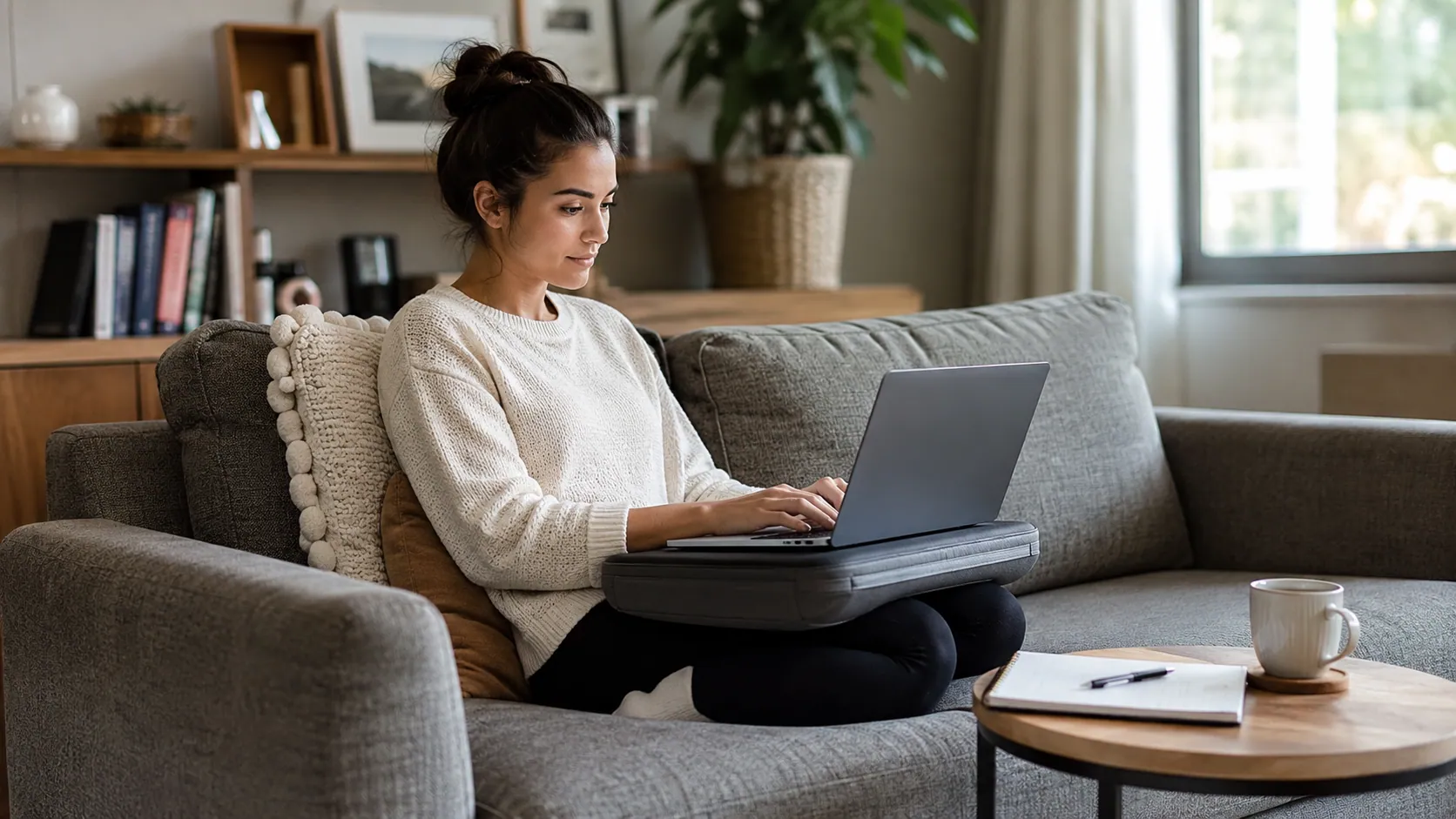
How to easily do work on the couch with laptop is a common question for remote workers, students, freelancers, and anyone who wants a more relaxed way to get things done at home. The couch feels comfortable, casual, and convenient, but it can quickly become a problem if your laptop couch setup causes neck strain, lower back pain, wrist discomfort, or poor focus.
The good news is that you can work on couch with laptop comfortably if you build a simple setup around three things: support, stability, and movement. Your back needs support, your laptop needs a stable surface, your screen should be easier to see, and your body should not stay frozen in one position for hours.
This guide explains how to create a practical couch laptop setup using a lap desk, pillows, a laptop stand, an external keyboard and mouse, and smart productivity habits. You do not need a full home office to work better. You just need to avoid the most common couch work mistakes and turn your sofa into a temporary, comfortable, and safer workstation.
Is It Okay to Work on the Couch With a Laptop?
Yes, it is okay to work from couch with laptop for short sessions, light tasks, and flexible work. But the couch should not become your main full-day workstation if it forces you into poor posture. Sofas are designed for relaxing, not for long hours of typing, reading, meetings, or focused laptop work.
The biggest problem with sofa laptop work is that most people sink into the cushions, round their shoulders, bend their neck downward, and place the laptop directly on their lap. This position can create neck strain, lower back pain, wrist strain, and even eye strain over time. A soft couch also makes it harder to keep your feet supported and your spine in a neutral position.
A better way to think about couch work is this: the couch can be a temporary ergonomic couch workstation, not a replacement for a proper desk. Use it for short work blocks, casual planning, reading, emails, or light admin tasks. For long writing sessions, detailed spreadsheet work, design tasks, or video calls, a proper workstation with better screen height and back support is usually the healthier choice.
A practical rule is to reset your posture every 20–30 minutes. If you notice discomfort before that, move sooner. Couch work should feel comfortable, not like something your back and neck have to survive.
The 5-Minute Couch Laptop Setup Checklist
A good couch laptop setup does not need to be complicated. Before you start working, spend five minutes arranging your space so your body, laptop, and work tools are supported.
Use this quick checklist:
| Setup Step | Why It Helps |
| Choose the firmest couch seat | Prevents sinking and slouching |
| Add a pillow or rolled towel behind your lower back | Creates lumbar support |
| Place the laptop on a hard, flat surface | Improves stability and airflow |
| Raise the screen slightly if possible | Reduces neck strain |
| Use a wireless mouse or keyboard | Helps keep wrists straighter |
| Keep charger, notebook, and phone nearby | Reduces twisting and reaching |
| Set a timer for 20–30 minutes | Reminds you to move and reset posture |
If you do not have a lap desk or laptop tray, use a firm board, a large book, or a stable tray. The goal is to keep the laptop off soft cushions and blankets. A hard surface protects the laptop’s vents and gives your hands a steadier typing position.
This simple couch work checklist helps you create a comfortable mini workstation without needing a separate home office. It also reduces distractions because everything you need is within reach before you begin.
Choose a Stable Surface: Lap Desk, Tray, or Side Table
One of the most important parts of how to work comfortably on the couch with a laptop is choosing the right surface. Placing your laptop directly on your lap, blanket, or soft cushion may feel easy, but it often causes two problems: unstable typing and poor laptop airflow.
A lap desk is usually the easiest option for couch work. It gives your laptop a flat surface, keeps it more stable, and helps prevent fabric from blocking the vents. A laptop tray table can also work well, especially if it has enough space for a mouse. If you have limited room, a C-shaped side table can slide close to the sofa and create a small desk-like surface.
Here is a simple comparison:
| Option | Best For | Main Benefit |
| Lap desk | Everyday couch laptop work | Stable surface and better airflow |
| Laptop tray | Light work and casual use | Portable and easy to move |
| C-shaped side table | Small spaces | Creates a mini couch desk |
| Laptop stand | Better screen height | Helps reduce neck strain |
| Stack of books | Budget setup | Raises laptop without buying gear |
A good surface should feel steady, wide enough for your laptop, and safe from tipping. Features like non-slip edges, wide legs, and a flat top panel can make a big difference. If your laptop feels wobbly, too hot, or too low, your setup needs adjusting.
Support Your Back and Sit With Better Posture
The couch becomes uncomfortable when your lower back loses support. Most sofas are soft and deep, which means your hips may sink lower than your knees. That position encourages slouching and makes it harder to maintain a neutral spine.
To improve your best posture for laptop on couch, start by sitting as far back as comfortably possible. Place a firm pillow, cushion, or rolled towel behind your lower back. This creates lumbar support and helps maintain the natural curve of your spine. If the couch is very deep, add another pillow behind your upper back so you are not leaning backward too much.
Your feet should feel supported. If they do not reach the floor comfortably, use a low box, cushion, or footrest. This reduces pressure on your hips and lower back. Try to keep your shoulders relaxed, elbows close to your body, and wrists as straight as possible.
A helpful way to check your posture is to ask: “Am I reaching, folding, or sinking?” If you are reaching toward a coffee table, folding your neck downward, or sinking into soft cushions, your couch laptop setup needs support.
Good couch ergonomics are not about sitting perfectly still. They are about creating enough support so your body does not fight the setup while you work.
Raise the Screen and Protect Your Neck
One major reason people search for how to use a laptop on the sofa without neck pain is that laptop screens sit too low. When the screen is on your lap, your head naturally tilts forward. Over time, this can create tech neck, headaches, shoulder tension, and upper back discomfort.
The ideal goal is to bring the laptop screen closer to eye level. On a couch, this may not be perfect, but even a small improvement helps. You can raise the laptop with a laptop stand, lap desk, stack of books, or side table. The key is to avoid staring sharply downward for long periods.
However, there is one important rule: if you raise the laptop high, do not type directly on the built-in keyboard for long. That can lift your arms awkwardly and strain your shoulders. Instead, pair the raised screen with an external keyboard and mouse. This lets your screen sit higher while your hands stay lower and more relaxed.
A good screen setup should support a neutral neck position. Your head should feel balanced over your shoulders, not pulled forward. If you feel yourself leaning in, squinting, or bending your neck, increase font size, adjust screen brightness, or move the laptop closer.
Use a Keyboard and Mouse to Reduce Wrist Strain
A laptop is convenient because the screen, keyboard, and trackpad are all connected. But that same design makes it hard to create an ergonomic setup. If the screen is at a good height, the keyboard may be too high. If the keyboard is comfortable, the screen may be too low.
That is why an external keyboard and mouse can improve your ergonomic laptop desk setup on couch. A small wireless keyboard lets you type with relaxed shoulders and straighter wrists. A wireless mouse is usually easier for longer work sessions than using a trackpad at an awkward angle.
Try to keep your elbows close to your body and your wrists neutral. Avoid bending your wrists upward, sideways, or pressing them hard against the edge of a tray. If your shoulders feel raised, your keyboard may be too high. If your hands feel cramped, your surface may be too small.
For people who work on laptops often, an ergonomic keyboard or ergonomic mouse can reduce strain. These tools are not required for everyone, but they help if you already feel wrist pain, forearm tension, or discomfort from repetitive motions.
Your hands should feel relaxed, not trapped by the couch setup. If typing feels awkward within the first few minutes, change the surface height or move to a better workstation.
Keep Your Laptop Cool and Safe
Another important part of how to keep laptop from overheating on couch is airflow. Laptops need ventilation to release heat. When you place a laptop on blankets, cushions, or soft fabric, the vents can become blocked. This may cause a hot laptop, louder fan noise, slower performance, or long-term heat stress.
To protect your laptop, always use a hard flat surface for laptop work. A lap desk, tray, or laptop stand can help keep the vents clear. If your laptop runs hot, a laptop cooling pad may help, especially during summer or long work sessions.
Avoid placing your laptop directly on:
- Blankets
- Soft cushions
- Thick fabric
- Your lap for long periods
- Uneven sofa arms
Couch work also creates everyday safety risks. Keep drinks away from the laptop, avoid tangled charger cables, and make sure the laptop is not balanced near the edge of the couch. If you have pets or children nearby, route cables so they cannot be pulled easily.
A safe laptop couch setup protects both your device and your body. Comfort is important, but stability and airflow matter just as much.
Stay Productive While Working From the Couch
The couch is comfortable, but that comfort can make it harder to focus. Many people sit down to work and end up scrolling, watching TV, or getting sleepy. To make couch productivity setup work, you need clear boundaries.
Start by choosing the right type of work. Couch work is best for lighter tasks, such as reviewing documents, answering emails, reading, planning, or brainstorming. It is not always best for deep work that requires intense concentration for several hours.
Use time blocking to stay focused. For example, set a 25-minute work block, then stand up, stretch, and reset your posture. Keep only the tools you need nearby: laptop, charger, notebook, water, and phone. Turn off the TV and reduce background distractions.
A simple quote to remember is:
“Comfort should support your work, not replace your focus.”
If the couch makes you too relaxed, change your environment slightly. Sit more upright, use a tray table, improve lighting, or move to a firmer seat. Your goal is to create a productive couch workstation, not a nap zone with a laptop.
Best Tasks to Do From the Couch — and Tasks to Avoid
Not every task belongs on the couch. A smart work-from-home setup matches the task to the space. Couch work is useful for short, flexible tasks, but a desk is better for work that requires precision, posture, or long focus.
| Good Couch Tasks | Better at a Desk |
| Reading emails | Long writing sessions |
| Light research | Video editing |
| Reviewing documents | Spreadsheet-heavy work |
| Watching training videos | Design work |
| Planning your day | Long meetings |
| Simple admin | Precision mouse work |
| Brainstorming ideas | Multi-monitor work |
This section is important because many users ask whether couch vs desk for laptop work really matters. The answer depends on the task and how long you are working. If you are checking email for 20 minutes, a couch setup can be fine. If you are working for four hours, your body will likely need a better chair, desk height, monitor height, and input device placement.
For long sessions, move to a proper workstation when possible. Your couch can support productivity, but it should not force your body into discomfort.
Budget Couch Laptop Setup Without Buying Anything
You do not need expensive accessories to build a budget ergonomic couch setup. If you want an ergonomic couch setup without buying anything, start with items already in your home.
Use a firm pillow behind your lower back for support. Place a book, tray, or cutting board under the laptop to create a stable surface. Use a rolled towel to fill the gap between your lower back and the sofa. Put your feet on a box if they do not rest comfortably on the floor. Use a small side table for your charger, notebook, phone, and water.
This kind of setup is especially helpful for a small apartment laptop setup, dorm room, shared space, or living room where there is no room for a full desk. The goal is not perfection. The goal is to make the couch safer, more stable, and less painful.
A no-budget couch setup should include:
- A firm back support
- A hard laptop surface
- Clear laptop airflow
- Good lighting
- A nearby place for accessories
- Regular movement breaks
Small improvements can make a big difference. Even one pillow and one hard surface can turn a poor couch setup into a more comfortable temporary workstation.
Best Accessories for a Comfortable Couch Laptop Setup
If you work from the couch often, a few accessories can make your setup easier and more ergonomic. You do not need all of them. Choose based on your biggest problem: back pain, neck strain, wrist discomfort, overheating, or lack of space.
| Accessory | Best For | Why It Helps |
| Lap desk | General couch laptop work | Adds a stable surface and improves airflow |
| Laptop stand | Neck comfort | Raises the screen closer to eye level |
| External keyboard | Typing comfort | Keeps wrists and arms more relaxed |
| Wireless mouse | Easier navigation | Reduces trackpad strain |
| Lumbar pillow | Back support | Helps maintain neutral spine |
| Cooling pad | Laptop heat | Protects airflow during longer sessions |
| C-shaped side table | Small spaces | Creates a mini workstation beside the couch |
| Portable monitor | Multitasking | Adds screen space for heavier work |
For most users, the best starting combination is a lap desk, lumbar pillow, and wireless mouse. If you want better posture, add a laptop stand and external keyboard. If your laptop overheats, prioritize a cooling pad or hard tray surface.
The right accessories should make work easier, not clutter your couch. Keep the setup simple enough that you can use it every day.
Common Couch Laptop Work Mistakes to Avoid
Many couch work problems come from small habits repeated for too long. Avoiding these mistakes can protect your posture, focus, and laptop.
The first mistake is placing your laptop directly on a blanket or cushion. This blocks airflow and creates an unstable typing surface. The second mistake is reaching forward to a coffee table. That position often causes rounded shoulders, bent neck posture, and lower back strain.
Another common mistake is working for hours without breaks. Even a comfortable setup can become uncomfortable if you never move. Stand up every 20–30 minutes, roll your shoulders, stretch your wrists, and look away from the screen.
Also avoid keeping drinks too close to the laptop, letting charger cables cross walking areas, or balancing your laptop on the edge of the sofa. These may seem like small details, but they can lead to spills, falls, or cable damage.
Most importantly, do not ignore pain. If your neck, back, wrists, or eyes begin to hurt, your body is giving you feedback. Adjust your setup or move to a proper workstation.
Couch Laptop Setup for Small Apartments and No-Desk Spaces
Many people search for how to work from home without a home office because they live in small apartments, dorm rooms, shared homes, or bedrooms. In these spaces, the couch may be the only realistic work area.
A good no desk work-from-home setup should be compact and easy to store. Use a foldable lap desk, a slim side table, or a portable laptop stand. Keep your work items in one basket or tray so you can set up and pack away quickly. This helps protect your living space from becoming messy and stressful.
For a shared space work-from-home setup, consider headphones, a small lamp, and a clear work schedule. If your couch is in a living room, create a “work mode” by turning off the TV, clearing the coffee table, and using the same setup each time.
A portable couch workstation works best when it is simple. You should be able to create your setup in a few minutes, work comfortably, then return the space to normal when you are done.
FAQ About Working on the Couch With a Laptop
What is the best way to work on the couch with a laptop?
The best way is to use a stable surface, support your lower back, raise the screen when possible, and take regular breaks. A lap desk, pillow, and wireless mouse can make a simple couch setup much more comfortable.
Is it bad to work from the couch every day?
It can be bad if you work for long hours in a slouched position. Daily couch work is safer when used for short sessions, with posture resets every 20–30 minutes. For full-day work, a proper workstation is usually better.
How long can you work from the couch safely?
There is no single perfect time for everyone, but couch work is best in short blocks. If your setup is not fully ergonomic, keep sessions brief and move often. A useful habit is to stand, stretch, and reset your posture every 20–30 minutes.
Should I use a lap desk on the couch?
Yes, a lap desk for couch work is one of the easiest upgrades. It gives your laptop a hard, stable surface and helps protect airflow. It also makes typing and using a mouse more comfortable.
How do I stop my laptop from overheating on the couch?
Keep the laptop off blankets, cushions, and soft fabric. Use a hard flat surface, laptop tray, stand, or cooling pad. Make sure the laptop vents are not blocked.
Can I work from the couch without buying accessories?
Yes. Use a firm pillow for back support, a rolled towel for lumbar support, and a book or tray under the laptop. This creates a simple budget ergonomic couch setup without buying anything.
Conclusion
Learning how to easily do work on the couch with laptop is really about making the couch more supportive, stable, and focused. You can work comfortably from the sofa if you use a hard surface, support your lower back, raise the screen when possible, protect your wrists, keep your laptop cool, and take regular breaks.
A couch setup is best for short, flexible work sessions, not full-day deep work. But with a smart couch work setup, the right posture habits, and a few helpful accessories, you can turn your sofa into a practical temporary workstation that supports both comfort and productivity.